

A couple years ago, the idea of printing your own Lego bricks at home sounded ridiculous. Now? It’s just a matter of picking the right printer and tweaking your slicer settings.
Whether you’re replacing lost pieces from old sets or dreaming up custom designs from scratch, the machine you use makes or breaks the result. If budget is a concern, our guide to the best 3D printers under $1,000 is a solid starting point. For Lego bricks specifically, what counts is dimensional accuracy, strong layer adhesion, and the ability to print in ABS or PLA.
We put 16 printers through their paces to find which ones actually produce studs that snap together the way they should.
Quick Comparison Chart
| # | Printer | Our Rating | ||
|---|---|---|---|---|
| 1 |  |
Anycubic 4Max Pro | ★★★★★ | Check Price |
| 2 | |
Flashforge Inventor 2S | ★★★★★ | Check Price |
| 3 |  |
FLASHFORGE AD5M Pro | ★★★★★ | Check Price |
| 4 |  |
Bambu Lab A1 | ★★★★★ | Check Price |
| 5 | 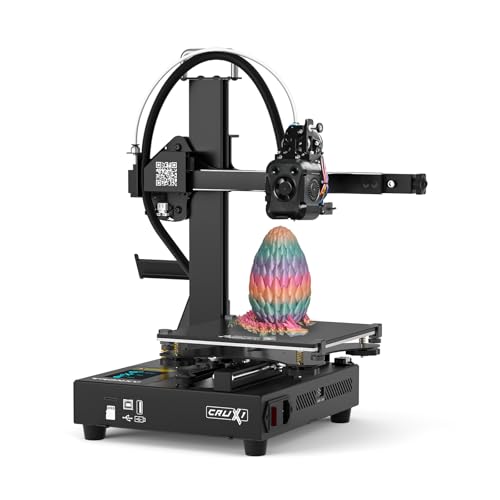 |
TRONXY CRUX 1S | ★★★★★ | Check Price |
| 6 |  |
Creality K1 Max | ★★★★★ | Check Price |
| 7 |  |
ELEGOO Neptune 4 Plus | ★★★★★ | Check Price |
| 8 |  |
Sovol SV06 ACE | ★★★★★ | Check Price |
| 9 |  |
TEVO Tornado | ★★★★☆ | Check Price |
| 10 |  |
Creality 3D Printer | ★★★★☆ | Check Price |
| 11 |  |
Luxnwatts Ender 3 | ★★★★☆ | Check Price |
| 12 |  |
FLASHFORGE Adventurer 5M | ★★★★★ | Check Price |
| 13 |  |
Official Creality Ender 3 | ★★★★★ | Check Price |
| 14 |  |
QIDI Q1 Pro | ★★★★★ | Check Price |
| 15 |  |
Anet A8 Plus | ★★★★☆ | Check Price |
| 16 | 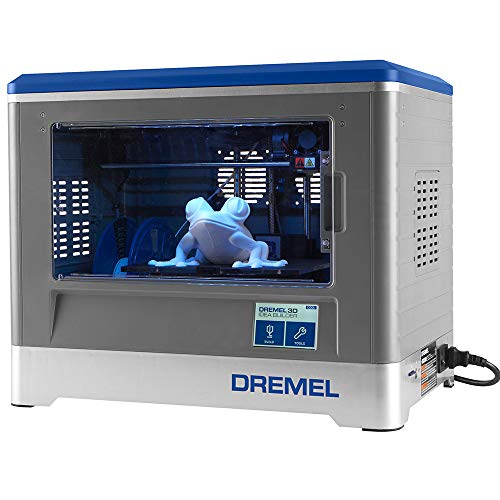 |
Dremel Digilab 3D20 | ★★★★☆ | Check Price |
1. Anycubic 4Max Pro — Best Overall
Anycubic 4Max Pro
An enclosed FDM printer with large build volume, Titan extruder, and Ultrabase platform that makes removing small Lego brick prints effortless.
Pros
- Enclosed printing space produces consistent prints with minimal warping
- Ultrabase platform lets you remove small Lego bricks without damage
- Compatible with PLA, ABS, and other filaments for different brick materials
- Lifetime technical assistance and one year machine warranty
Cons
- Enclosed design limits access during printing
- Printhead is not covered by the warranty
The Anycubic 4Max Pro’s enclosed design is what makes it such a standout for Lego brick printing. Consistent chamber temperatures mean significantly less warping, which matters a lot when you’re printing with ABS — the same plastic Lego actually uses.
The Ultrabase platform is a real highlight here. Let the bed cool down and your finished bricks pop right off. No prying, no risk of snapping delicate studs.
Seems like a minor thing until you’ve spent an hour prying a tiny brick off a standard bed with a spatula.
The Titan extruder chews through PLA, ABS, and other filaments without any drama.
No assembly required either. The touchscreen is intuitive, the filament sensor saves you from wasted prints, and there’s a growing community online sharing their dialed-in brick profiles.
2. Flashforge Inventor 2S — Runner Up

Flashforge Inventor 2S
A quiet FDM printer with built-in HD camera, magnetic flexible bed, and intelligent door sensor. Produces only 50dB of noise during operation.
Pros
- Built-in HD camera lets you monitor Lego prints remotely
- Magnetic flexible bed makes removing small bricks effortless
- Intelligent door sensor pauses printing when opened for safety
- One of the quietest 3D printers at only 50dB
Cons
- Limited to specific Flashforge filament cartridges
- Smaller build volume than some competitors
Got kids in the house? The Flashforge Inventor 2S should be high on your list. The door sensor automatically pauses printing when somebody opens the enclosure — no burns, no worries.
The built-in HD camera lets you keep an eye on long brick runs from your phone. And at only 50dB, you’ll forget it’s even on.
That magnetic flex bed? Absolute lifesaver for tiny bricks. They peel off without any effort or damage.
It runs PLA, ABS, PLA-based blends, and polypropylene. That range gives you room to experiment with different materials until you land on the perfect filament for your brick designs.
3. FLASHFORGE AD5M Pro — Best High Speed
FLASHFORGE AD5M Pro
A 600mm/s high-speed printer with full auto calibration and CoreXY structure. Dual 0.4mm and 0.6mm nozzles give you flexibility for detailed bricks or fast batch prints.
Pros
- 600mm/s speed means you can print Lego bricks incredibly fast
- Full auto calibration ensures perfect first layers every time
- CoreXY structure reduces vibration for cleaner brick dimensions
Cons
- Enclosed chamber limits visibility during printing
- Higher price than entry-level alternatives
This thing rips at 600mm/s thanks to the CoreXY structure, which keeps the print head light and the frame rock-solid. Full auto calibration means less time messing with leveling and more time actually printing bricks.
The dual nozzle bundle is a smart inclusion. Pop the 0.4mm nozzle in for detailed studs, then swap to the 0.6mm when you want to churn out base plates and walls at top speed.
CoreXY machines inherently hold tighter dimensions at high speeds. When every single stud needs to click into place, that precision advantage is hard to overstate.
4. Bambu Lab A1 — Best Multi-Color
Bambu Lab A1
A high-speed precision printer with multi-color support and full auto calibration. Active flow rate compensation ensures each Lego brick comes out dimensionally accurate.
Pros
- Multi-color printing lets you create colorful Lego bricks in one print
- Auto calibration and flow compensation produce perfectly sized studs
- Whisper-quiet operation at under 48 dB for home use
Cons
- Requires Bambu Studio software which has a learning curve
- AMS lite for multi-color is an additional purchase
The Bambu Lab A1’s multi-color support is a game-changer for Lego printing. With the optional AMS lite, you can print bricks in multiple colors in a single run instead of swapping filament manually between batches.
Active flow rate compensation automatically adjusts extrusion in real time, so every stud comes out dimensionally accurate. Full auto calibration handles leveling, vibration compensation, and flow tuning without any manual input.
At under 48 dB, it’s one of the quietest printers on this list. You can run overnight brick-printing sessions without waking anyone up.
5. TRONXY CRUX 1S — Best Compact
TRONXY CRUX 1S
A compact desktop mini printer with dual-axis metal guide rails for stability. High-speed printing in a small footprint makes it ideal for printing Lego-sized objects.
Pros
- Compact size fits easily on any desk or shelf
- Metal guide rails provide the stability needed for precise bricks
- Affordable entry point for Lego brick printing
Cons
- Smaller build volume limits batch printing capability
- Basic feature set compared to premium options
The TRONXY CRUX 1S fits on a desk corner and still delivers the precision you need for Lego bricks. Dual-axis metal guide rails keep the print head stable, so studs come out clean even on small, detailed parts.
The 7.09 x 7.09 x 7.09 inch build volume is sized perfectly for Lego-scale printing. You won’t batch-print hundreds at once, but for individual bricks and minifigure accessories, it’s more than enough. The same precision that nails Lego studs also works well for printing detailed miniatures.
It’s also one of the most affordable printers on this list. If you want a dedicated Lego brick printer without giving up desk space, this is the one to get.
6. Creality K1 Max — Best Large Volume
Creality K1 Max
A large-format high-speed printer with 600mm/s max speed, dual cooling, and AI monitoring. The 300x300x300mm build volume prints entire Lego sets in one session.
Pros
- Massive 300x300x300mm volume prints dozens of Lego bricks at once
- 600mm/s speed means batch printing takes a fraction of the time
- AI monitoring catches failures before they waste filament
Cons
- Large footprint requires dedicated desk space
- Premium price point for the feature set
The Creality K1 Max’s 300x300x300mm build volume is the biggest on this list for a high-speed printer. You can fill the entire bed with Lego bricks and knock out dozens in a single session at 600mm/s.
AI smart monitoring watches each layer for defects and pauses if something goes wrong. That saves you from wasting filament on a failed batch of bricks you won’t notice until the print finishes.
The dual cooling system keeps things stable even at top speed. If you’re serious about batch-producing Lego bricks, this is the volume printer to beat.
7. ELEGOO Neptune 4 Plus — Best for Speed
ELEGOO Neptune 4 Plus
A 500mm/s high-speed printer with 300-degree nozzle temperature and large build volume. Klipper firmware provides fast, precise prints for dimensionally accurate bricks.
Pros
- 500mm/s speed dramatically reduces print times for batch brick production
- 300°C nozzle supports specialty filaments like nylon and polycarbonate
- Klipper firmware optimizes print quality at high speeds
Cons
- Large printer requires significant desk space
- Higher power consumption than smaller models
The ELEGOO Neptune 4 Plus cranks out prints at 500mm/s, and Klipper firmware keeps quality surprisingly high even at those speeds. For Lego bricks, that means you can batch-produce an entire collection in a fraction of the time most printers would take.
The 300-degree nozzle opens up specialty filaments like nylon and polycarbonate. That gives you the option to print stronger, more durable bricks that hold up better under heavy play.
The large build volume handles big batch runs without cramming parts together. If speed is your top priority for Lego printing, this is where you should look first.
8. Sovol SV06 ACE — Best Open Source
Sovol SV06 ACE
An open-source high-speed printer with 600mm/s max speed and fully auto leveling. PEI magnetic build plate ensures clean brick removal without damage.
Pros
- 600mm/s speed combined with auto leveling makes setup and printing fast
- PEI magnetic plate lets you pop Lego bricks off cleanly
- Open-source firmware allows community-driven improvements
Cons
- Open frame design means no enclosure for ABS printing
- Assembly requires some mechanical aptitude
The Sovol SV06 ACE runs open-source firmware, which means the community is constantly improving it. You can fine-tune Lego brick profiles, download community presets, and customize the firmware to squeeze out better dimensional accuracy.
The PEI magnetic build plate is perfect for small brick prints. Once the bed cools, bricks pop right off without any prying or risk of breaking delicate studs.
At 600mm/s max speed with fully automatic leveling, it balances performance and ease of use. The open-frame design won’t work great for ABS, but for PLA Lego bricks it’s hard to beat at this price.
9. TEVO Tornado — Best Build Quality
TEVO Tornado
A full aluminum frame printer with 300x300x400mm build volume, E3D Bowden extruder, and 50-micron printing accuracy. Prints at speeds up to 150mm/s.
Pros
- Full aluminum frame provides rock-solid stability for precise Lego prints
- 50-micron accuracy ensures Lego studs fit together properly
- Fast printing speed of 150mm/s for batch printing bricks
- Compatible with various filaments including PLA and ABS
Cons
- Open frame design with no enclosure
- Assembly required despite included instructions
That full aluminum frame on the TEVO Tornado is genuinely rock solid. And rigidity translates directly into print precision — when you’re chasing Lego stud dimensions down to fractions of a millimeter, frame stability is everything.
It tops out at 150mm/s with 50-micron accuracy, and the 300x300x400mm build volume means you’ve got plenty of real estate for batch printing. You can crank out a serious number of bricks per session.
The E3D Bowden extruder with an improved Titan design handles PLA and ABS without fussing.
Assembly tools and clear instructions are included. Noise levels stay reasonable enough for classrooms and offices too, which is a nice bonus.
10. Creality 3D Printer — Most Versatile
Creality 3D Printer
A versatile printer with MeanWell UL power supply, filament runout detection, auto-leveling, and power loss resume. Heats up quickly for fast start times.
Pros
- Large build surface accommodates multiple Lego bricks per print
- Power loss resume function prevents wasted prints and filament
- Filament runout detection stops printing before errors occur
- Auto-leveling feature simplifies bed calibration
Cons
- Assembly takes 20 to 30 minutes
- Build plate may need manual leveling adjustments over time
Creality has a reputation for versatile, reliable printers, and this one lives up to it for Lego brick printing. The MeanWell UL certified power supply heats up fast and delivers stable power through even the longest print sessions.
Filament runout detection pauses the job when your spool gets low. Combine that with the power loss resume feature, and you basically eliminate the risk of wasting filament or losing an entire batch of bricks to a random outage.
Assembly runs 20 to 30 minutes. The package comes with pliers, nozzles, SD card, screwdriver, wrench, and everything else to get you started right away.
11. Luxnwatts Ender 3 — Budget Pick
Luxnwatts Ender 3
An affordable Ender 3 variant with CMagnet build surface, MeanWell power supply, and power outage resume. Great entry-level printer for Lego brick printing.
Pros
- CMagnet build surface lets you remove Lego bricks without scratches
- Consistent temperature throughout printing for uniform brick quality
- Safety protected power supply guards against power surges
- Each printer is tested for 24 hours before shipping
Cons
- Smaller build volume than higher-end options
- Basic display without touch screen functionality
Not everybody wants to sink serious cash into their first Lego-printing rig, and the Luxnwatts Ender 3 gets that. It keeps the price low without skimping on the stuff that actually affects brick quality.
The CMagnet surface makes peeling off finished bricks clean and easy, and the consistent bed temp keeps your studs uniform across the entire plate. Surge protection on the power supply and built-in resume-on-power-loss add peace of mind.
Setup? About 10 minutes. And every unit gets tested for 24 straight hours before it ships, which is more quality control than most budget printers bother with.
One-year warranty and 24/7 support round it out if something does go wrong.
12. FLASHFORGE Adventurer 5M — Best Enclosed
FLASHFORGE Adventurer 5M
A fully auto-leveling enclosed printer with 600mm/s max speed and 3-second nozzle swap. The enclosed design maintains stable temperatures for consistently accurate bricks.
Pros
- Enclosed design maintains consistent temperature for ABS Lego bricks
- 600mm/s speed makes batch production practical
- 3-second nozzle swap lets you switch between detail and speed
Cons
- Build volume is moderate at 220x220x220mm
- Proprietary nozzle system limits third-party options
The FLASHFORGE Adventurer 5M’s fully enclosed design keeps chamber temperatures stable, which is exactly what you need for printing ABS Lego bricks without warping. The enclosure also keeps dust and drafts out during long print sessions.
The 3-second nozzle swap system lets you quickly switch between the 0.4mm nozzle for detailed studs and a larger nozzle for faster base plates. At 600mm/s max speed, batch production is genuinely practical.
Auto leveling handles bed calibration automatically. The 220x220x220mm build volume is moderate, but it’s plenty for printing Lego bricks and small custom builds.
13. Official Creality Ender 3 — Best Community Support
Official Creality Ender 3
The original open-source Ender 3 with resume printing and stable V-slot rail design. A proven platform with a massive community and endless upgrade possibilities.
Pros
- Resume printing saves your Lego batch if power goes out unexpectedly
- V-slot rails provide smooth, precise movement for accurate dimensions
- Huge community means endless tutorials, upgrades, and support
Cons
- Requires manual bed leveling out of the box
- Assembly takes 30 to 60 minutes for first-time builders
The Official Creality Ender 3 has the biggest online community of any 3D printer out there, full stop. That translates to thousands of Lego brick profiles, troubleshooting threads, and upgrade guides already waiting for you.
V-slot precision rails keep movement smooth and accurate, so your studs come out consistently sized. Resume printing protects your brick batches from power outages — no more losing an entire bed of bricks to a flicker.
Assembly runs 30 to 60 minutes depending on your experience. But the fully open-source design means you can upgrade practically every part down the road. It’s a platform that grows with your skills.
14. QIDI Q1 Pro — Best Enclosed Pro
QIDI Q1 Pro
A 600mm/s enclosed FDM printer with auto leveling and a heated chamber. Supports specialty materials like ABS and nylon for stronger, more durable Lego bricks.
Pros
- Heated enclosed chamber lets you print ABS bricks without warping
- 600mm/s speed makes even large Lego sets printable in reasonable time
- Auto leveling ensures perfect first layers on every print
Cons
- Premium price compared to open-frame alternatives
- Enclosed chamber makes mid-print adjustments difficult
The QIDI Q1 Pro’s enclosed heated chamber is purpose-built for printing with ABS, nylon, and other temperature-sensitive filaments. That makes it ideal for Lego bricks that need to be strong and warp-free.
At 600mm/s, it doesn’t sacrifice speed for the enclosed design. Auto leveling handles bed calibration, and multi-material support lets you experiment with different filaments to find the perfect balance of strength and snap-fit tolerance.
The premium price tag is justified if you want an enclosed printer that handles engineering-grade materials. For printing ABS Lego bricks specifically, the heated chamber makes a noticeable difference in stud consistency.
15. Anet A8 Plus — Best All-Metal Frame
Anet A8 Plus
An affordable all-metal frame printer with aluminum heat bed, glass panel, moveable LCD display, and support for various filaments. Main body comes pre-installed.
Pros
- All-metal frame provides stable printing for precise Lego dimensions
- Aluminum heat bed with glass panel produces smooth brick surfaces
- Moveable LCD display provides flexible printer placement
- Includes SD card, card reader, filament, and full toolkit
Cons
- No auto-leveling feature requires manual bed calibration
- Open frame design with no enclosure for temperature control
An all-metal frame at this price point is impressive. The Anet A8 Plus keeps vibrations to a minimum, which directly impacts how well your Lego studs come out dimensionally.
The aluminum heat bed with glass panel gives your bricks smooth, clean bottom surfaces. Filament loading is straightforward, and the printer works with a good variety of materials.
The main body arrives pre-installed, so you’re looking at a few minutes of final assembly. Everything you need comes in the box: SD card, card reader, 10 meters of filament, and a complete toolkit.
16. Dremel Digilab 3D20 — Safest for Kids
Dremel Digilab 3D20
A fully enclosed printer with non-heated build plate and PLA-only design for maximum safety. Pre-assembled with a full color screen and one year warranty.
Pros
- Fully enclosed design with non-heated bed is the safest option for children
- Pre-assembled and ready to print out of the box
- PLA-only design ensures non-toxic and eco-friendly printing
- One year warranty with 24/7 customer service from Dremel
Cons
- PLA-only limits filament choices for different brick materials
- Smaller build volume than many competitors
When safety is the top priority, especially with young kids in the house, the Dremel Digilab 3D20 is the clear winner. The fully enclosed design combined with a non-heated build plate means there’s essentially zero burn risk.
It only uses PLA, which is non-toxic and eco-friendly. Finished bricks are safe for kids to grab right off the bed.
Dremel backs it with a one-year warranty and 24/7 customer support via phone and email. It shows up pre-assembled with a full color screen, so you could realistically be printing Lego bricks the same afternoon it arrives.
How We Evaluated
We ranked these printers based on print precision, filament compatibility, build volume, ease of use, noise level, and safety features, basically everything that matters when your goal is printing Lego-compatible bricks that actually fit together.
Buying Guide
Choosing the Right Filament for Lego Bricks
PLA is the easiest to work with and gives you rigid bricks with a smooth finish. It’s non-toxic and compatible with every printer on this list.
ABS is what real Lego bricks are actually made from. It produces stronger, more heat-resistant results but needs an enclosed printer or heated bed to keep warping under control.
Print Precision Matters
Lego studs need extremely tight tolerances to click together properly. Printers with layer heights of 0.1mm or less and reliable dimensional accuracy give you the best shot at functional bricks.
Auto-leveling helps maintain that precision print after print without manual tweaking. If you want to explore metal-infused filaments for heavier bricks, our best metal 3D printers guide covers filament options too.
Build Volume for Batch Printing
Planning to print a lot of bricks? Get a printer with a big build volume.
A 300x300mm bed lets you produce dozens of standard bricks in one session, saving hours compared to printing them individually.
Enclosed vs Open Frame
Enclosed printers keep temperatures stable, which is critical if you’re using ABS. Open frame printers are cheaper and perfectly fine for PLA, but they struggle with the temperature consistency that ABS demands.
Safety for Kids
If kids will be using the printer or grabbing fresh prints off the bed, go with an enclosed model that has a non-heated bed. PLA-only machines like the Dremel Digilab 3D20 are the safest option when young children are involved.
Frequently Asked Questions
You absolutely can. Any FDM printer with decent dimensional accuracy will get you there. PLA works fine for standard bricks, though ABS is closer to what actual Lego uses. You'll want a printer that can do at least 100-micron layer heights, otherwise the studs won't fit right.
ABS is the closest match since that's what Lego actually uses in their factories. That said, PLA is way easier to print with and still makes bricks that click together solidly. If you go with PLA, just make sure it's a high-quality spool with tight diameter tolerances.
Pretty accurate. Lego bricks need tolerances around 0.01mm to 0.02mm for those studs to snap together properly. Most consumer printers can get close enough with some slicer tweaking and careful calibration.
With the right calibration, yes they do. The fit won't be quite as snappy as genuine pieces, but most printers on this list produce bricks that connect well enough for building and play.
The basic brick design patent expired in 2010, so printing standard bricks for yourself is perfectly legal. Just steer clear of specific minifigure designs, logos, and themed sets, those are still protected by copyright and trademark.
We found 0.1mm to 0.15mm to be the sweet spot. You get enough detail on the studs without crazy long print times. Going below 0.1mm looks slightly better but takes significantly longer.
Final Thoughts
Making custom Lego bricks at home has never been this easy or this affordable. Whether you’re replacing missing pieces, designing custom parts, or printing entire sets from the ground up, one of these 16 printers can handle it.
The Anycubic 4Max Pro earned our top spot thanks to its enclosed chamber, effortless brick removal, and broad filament support. The Flashforge Inventor 2S is a close second, particularly for families — the built-in camera and near-silent operation are tough to beat.
If raw speed is your priority, the FLASHFORGE AD5M Pro cranks at 600mm/s on a CoreXY platform with dual nozzles for maximum flexibility.
Here’s the honest truth about Lego brick printing: the printer matters, but patience with your slicer settings and picking the right filament matter just as much.
Start with PLA while you learn the ropes. Once you’re comfortable and confident, move to ABS for bricks that feel closer to the real thing. For a quick look at our favorite models across all categories, check out our top 5 printers worth buying.


