

A few years ago, the idea of having a 3D printer on your desk at home was borderline absurd. These machines lived in corporate R&D labs and cost enough to make your eyes water.
That world doesn’t exist anymore. Today you’ll find 3D printers in classrooms, garage workshops, engineering firms, and design studios all over the place. The technology went from luxury to mainstream shockingly fast.
The challenge now isn’t finding a printer — it’s picking the right one when dozens of models are fighting for your attention and your money.
I’ve spent the time so you don’t have to. Below you’ll find everything worth considering before you buy, along with our hands-on reviews of the 20 best 3D printers under $1,000.
Buying Guide
Durability, Reliability, and Portability
You need a machine that holds up over time without constant babysitting. Reliability and low maintenance should be near the top of your checklist. And if you’ll be hauling it between rooms or bringing it to a makerspace, portability matters too.
Purpose of the Printer
Think honestly about what you’ll actually print. Household stuff and toys? Prototypes for a design business? Demos in a classroom?
What you’re making tells you what features actually matter. Artists tend to prioritize multi-color capability. Engineers care about dimensional accuracy above all else. If Lego-compatible bricks are your goal, our guide to the best 3D printers for Legos zeroes in on the precision that requires. Either way, look for something that sets up without a headache.
Software
Most printers ship with their own software or work with popular free programs. Check that the software runs on your operating system, whether that’s Windows, Mac, or Linux.
Some printers let you separate the slicing and printing components, which gives you more flexibility. In most cases, you can download compatibility updates even if your OS isn’t supported right away.
Printer Connection
How you connect to your printer matters more than most people realize. USB is the most common option, but plenty of newer models have built-in memory so printing continues even after you unplug.
Wi-Fi connectivity is becoming standard on mid-range models. And printers with SD card slots let you print without a computer anywhere in the loop.
Open Frame vs. Enclosed
An open frame lets you watch the print in real time and access the extruder easily. That’s great for tinkerers.
Enclosed printers are quieter and safer around kids since the hot parts stay behind a barrier. If you’re printing at home, that peace of mind is worth considering.
Object Size
Match the printer’s build volume to what you plan to make. Nothing is more frustrating than finishing a design only to realize it won’t fit on your build plate.
Materials to Print With
Most printers use fused filament fabrication (FFF), melting plastic filament from a spool and extruding it layer by layer. The two main filament types are ABS and PLA.
ABS needs higher temperatures and produces tougher parts. PLA prints smoother at lower temps and is easier to work with, though it’s more brittle. You’ll also find printers that handle nylon, PVA, wood composites, bronze, copper, and other specialty materials.
Resolution
Higher resolution means finer detail, but it also means longer print times. Most printers handle 200 microns well, and many can reach 100 microns. Some can go down to 20 microns with the right calibration.
Just know that extremely fine resolution requires patience. A detailed print at 50 microns might take all night to finish. That trade-off is worth it if you’re printing miniatures or figurines, where every layer line shows.
Colors
Single-extruder printers handle one color at a time. You can swap filament manually for color changes, but it’s tedious. If you want seamless multi-color prints, look for a dual-extruder model.
Build Platform
A good build platform keeps your prints stuck during printing and lets them come off cleanly when they’re done. Heated beds help with adhesion, especially for ABS.
Some platforms need a thin layer of glue or tape. Others use magnetic or glass surfaces that release prints on their own once they cool down. Avoid perforated boards if you can, since removing prints from those can be a real headache.
With all that covered, let’s get into the reviews. These picks are based on hands-on experience and real user feedback.
Quick Comparison Chart
| # | Printer | Our Rating | ||
|---|---|---|---|---|
| 1 |  |
Monoprice MP Select Mini | ★★★★★ | Check Price |
| 2 | |
XYZPrinting Da Vinci Jr. | ★★★★★ | Check Price |
| 3 |  |
Printrbot Play | ★★★★★ | Check Price |
| 4 |  |
Robo 3D R1 Plus | ★★★★☆ | Check Price |
| 5 |  |
M3D Micro | ★★★★☆ | Check Price |
| 6 |  |
XYZPrinting Da Vinci Jr Pro XE+ | ★★★★☆ | Check Price |
| 7 | 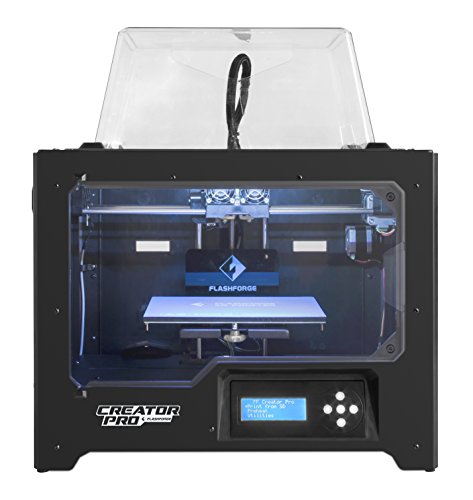 |
FlashForge Creator Pro | ★★★★☆ | Check Price |
| 8 |  |
Creality K1C 3D Printer | ★★★★☆ | Check Price |
| 9 | 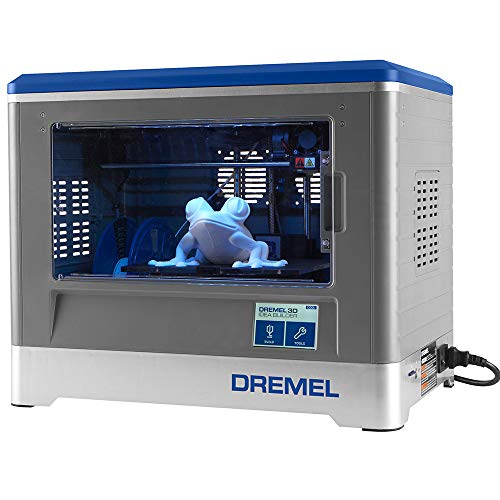 |
Dremel Idea Builder | ★★★★☆ | Check Price |
| 10 | 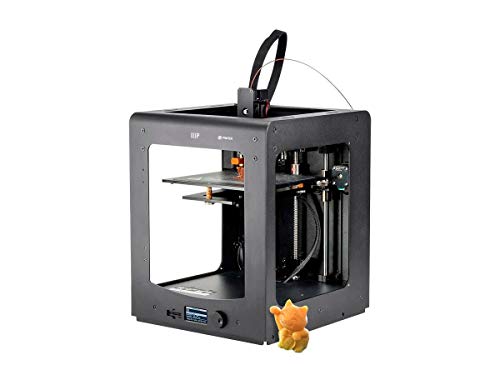 |
Monoprice Maker Select Ultimate | ★★★★☆ | Check Price |
| 11 | 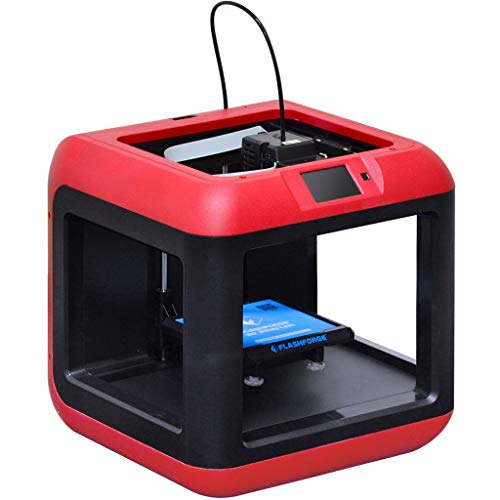 |
FlashForge Finder | ★★★★☆ | Check Price |
| 12 |  |
QIDI TECH 1 | ★★★★☆ | Check Price |
| 13 |  |
Hictop Prusa i3 | ★★★★☆ | Check Price |
| 14 |  |
XYZPrinting da Vinci AiO | ★★★★☆ | Check Price |
| 15 |  |
Alunar Prusa i3 | ★★★★☆ | Check Price |
| 16 |  |
Up Mini 2 | ★★★★☆ | Check Price |
| 17 |  |
ELEGOO Neptune 3 Pro | ★★★★☆ | Check Price |
| 18 |  |
Anycubic Kobra 3 V2 | ★★★★☆ | Check Price |
| 19 |  |
Geeetech Smart 3D Printer | ★★★★☆ | Check Price |
| 20 |  |
XYZPrinting da Vinci 2.0 Duo | ★★★★☆ | Check Price |
1. Monoprice MP Select Mini — Best Overall
Monoprice MP Select Mini
An incredibly affordable 3D printer with a heated build plate, SD card and USB connectivity, and compatibility with PLA, ABS, and exotic filaments. It produces quality prints rivaling printers costing four times as much.
Pros
- Produces quality prints rivaling printers costing four times as much
- Heated build plate works with PLA, ABS, PVA, metal, and wood composites
- SD card and USB connectivity for flexible printing options
- Can be upgraded with hot-end, glass bed, and Wi-Fi connectivity
Cons
- Small build volume of 120 x 120 x 120 mm limits project size
- Temperature controls can be inconsistent and melt filament
The price tag on this thing makes you do a double take. For what it costs, the Monoprice MP Select Mini goes toe-to-toe with printers that run three or four times as much.
It’s honestly one of the best deals in 3D printing right now.
Out of the box you get a heated build plate, SD card and USB connectivity, a cooling fan, steel filament feeder, and a color LCD for navigating settings. The heated plate is the real game-changer here — it supports PLA, ABS, PVA, metal composites, and wood filaments.
That kind of material range at this price? You don’t see it often.
The compromise is build volume. At 120 x 120 x 120 mm, you’re working with smaller projects only.
Print quality won’t rival premium machines straight away, but users who take the time to dial in their settings consistently report impressive results. If you’re not precious about the warranty, the upgrade path is wide open too — better hot-end, glass bed, even Wi-Fi connectivity.
The weakest link is temperature control, which can act up and occasionally melt filament in ways that hurt your prints. But for what you’re paying, that’s a manageable downside.
If you want to dip your toes into 3D printing without a major financial commitment, this is the printer to start with.
2. XYZPrinting Da Vinci Jr. — Best for Beginners

XYZPrinting Da Vinci Jr.
One of the most user-friendly 3D printers available with no manual calibration required. Comes with free XYZ design software and a printing guide for beginners.
Pros
- Extremely user-friendly with no manual calibration required
- Includes free XYZ maker 3D design and printing software
- NFC chip automatically detects filament type, color, and remaining amount
- Enclosed frame with viewing panel is safe for home and classroom use
Cons
- Only supports proprietary XYZPrinting filament spools
- No heated bed means ABS filament is not supported
For pure ease of use, the Da Vinci Jr. is really hard to beat. Zero manual calibration — set it up and start printing.
The four-line LCD and six navigation buttons give you clean, simple control over everything: stats, filament loading, print commands.
It’s single-extruder, so one color at a time. The build area feels a little small for the printer’s physical size, but it handles 100-micron prints without any fuss.
No heated bed, so ABS is a no-go. PLA, though? Prints beautifully.
Three flexible fitting tapes on the build platform hold objects down during printing. They’re easy to replace when they wear out.
XYZ maker 3D design software, XYZware printing software, and a STEAM 3D printing guide all come included at no extra cost.
Here’s the thing you should know: it only accepts proprietary filament spools. A built-in NFC chip auto-detects filament type, color, and how much is left, which is genuinely convenient.
The flip side is that third-party spools are a non-starter. XYZprinting’s proprietary filaments come in a decent variety of colors and melt consistently though.
If you want a cheap, dead-simple printer that’s actually fun to use right away, this is your pick. Just keep your expectations in check — it’s not trying to be a premium machine.
3. Printrbot Play — Most Portable
Printrbot Play
A lightweight, robust, and highly portable 3D printer with an aluminum body, powder-coated steel extruder, and software-based auto-leveling. Comes fully assembled.
Pros
- One of the most portable 3D printing systems on the market at just 13 lbs
- Fully assembled with software-based auto-leveling for quick setup
- Kit design allows expanding the vertical axis and build volume
- Metal plate bed provides reliable leveling for realistic results
Cons
- No heated bed limits you to PLA filament out of the box
- Small build volume of 100 x 100 x 130 mm
At 13 pounds, the Printrbot Play might be the most portable 3D printer you can reasonably buy. The price is right, the build is solid, and the compact footprint appeals to makers who don’t have a ton of space.
PLA works great out of the box. ABS is doable with an aftermarket heated bed upgrade. The Alu Extruder v2 has a powder-coated steel construction, and the aluminum body keeps the weight down.
An SD card slot means you can print without a computer tethered to it the whole time.
It arrives fully assembled — refreshing for a budget printer. Setup is fast and the machine runs stable with no rocking or vibration.
The metal plate bed pairs with software-based auto-leveling for reliable first layers. Resolution hits 100 microns, and you’ve got both USB and microSD connectivity.
They include a sample filament strand for test prints.
The missing heated bed is the obvious weak point. PLA prints beautifully, but ABS takes the upgrade and still won’t match what PLA produces on this machine.
On the bright side, the kit design lets you expand the vertical axis and build volume once you outgrow the default setup.
A solid entry point for makers who want quality results without premium pricing.
4. Robo 3D R1 Plus — Best Build Quality
Robo 3D R1 Plus
Designed for quality output with state-of-the-art linear motion, a large 254 x 229 x 203 mm build area, and support for PLA, ABS, t-glase, wood, and flexible filaments.
Pros
- Supports a wide range of materials including PLA, ABS, t-glase, and wood
- Heated bed minimizes misprint chances and reduces the need for rafts
- Integrates with a broad assortment of 3D design software packages
- Comes fully calibrated with a video tutorial for quick setup
Cons
- No on-printer controls requires a tethered computer connection
- USB-only connectivity with no SD card or wireless options
The Robo 3D R1 Plus is built for quality output, and it shows. State-of-the-art linear motion, a generous 254 x 229 x 203 mm build area, and solid components for leveling and guidance make it a strong choice for desktop 3D printing.
A 300g starter spool of Robo Blue filament gets you printing immediately, and a video tutorial walks through setup in short order. It ships fully calibrated, so there’s no fiddly manual leveling to deal with.
Material support is where this printer really stands out. The extruder handles PLA, ABS, t-glase, wood, HIPS, and flexible filaments with layer resolutions down to 100 microns.
The heated bed prevents extruded filament from cooling too fast and warping, which is especially important for ABS. It also reduces the need for rafts, saving you filament in the long run.
Software integration is broad, it works with a range of 3D design programs through Robo’s own software ecosystem.
The main limitation is connectivity. There are no on-printer controls, so you need a computer tethered via USB for the entire print job.
No SD card slot or wireless option. For beginners and intermediate users who don’t mind the USB requirement, this is a capable and reliable machine.
5. M3D Micro — Best Budget Pick
M3D Micro
A compact and durable 3D printer with micro motion technology for precision printing. Resolution ranges from 50 to 350 microns with 15-micron XY precision.
Pros
- Micro motion technology enables perfect precision at a fraction of the cost
- Resolution ranges from 50 to 350 microns for flexible detail levels
- Compact design makes it one of the smallest 3D printers available
- User-friendly software is great for beginners and kids
Cons
- Must stay connected to a computer during printing with no offline mode
- No heated bed makes ABS filament printing difficult
The M3D Micro’s price keeps dropping, and at what it costs now, the value proposition is pretty hard to argue with. It won’t handle big models or break speed records, but the software is friendly enough that total beginners can figure it out in minutes.
Resolution goes from 50 to 350 microns, and it prints with 1.75mm PLA and ABS. Without a heated bed, ABS is hit or miss — but PLA produces genuinely nice prints for a machine in this price range.
Just set your expectations on speed. Even small prints take their sweet time.
Single extruder means one color at a time. The micro motion technology is what makes this printer punch above its weight — you get surprisingly precise results for a fraction of what comparable accuracy usually costs.
The real catch? No offline mode. Your computer needs to stay connected and awake through the entire print.
If it sleeps or drops the connection, your print is toast. That tethering issue combined with the slow speeds is the biggest drawback by far.
As a fun, kid-safe way to get into 3D printing without spending much, the M3D Micro does exactly what it needs to.
6. XYZPrinting Da Vinci Jr Pro XE+ — Best Open Source
XYZPrinting Da Vinci Jr Pro XE+
A fully open-source 3D printer with a hardened steel nozzle for printing with carbon fiber and other abrasive materials. Compact build volume of 6.9 x 6.9 x 6.9 inches.
Pros
- Hardened steel nozzle handles carbon fiber and abrasive filaments
- Open-source firmware allows custom modifications
- Up to 20-micron resolution for incredibly fine details
Cons
- Smaller build volume than competitors at this price
- XYZware software has a learning curve
The Da Vinci Jr Pro XE+ stands out with its hardened steel nozzle, which handles carbon fiber and other abrasive filaments without wearing down. XYZprinting made this one fully open-source, so you’re not locked into proprietary firmware.
Build volume comes in at 6.9 x 6.9 x 6.9 inches with up to 20-micron layer resolution. That’s precise enough for detailed prototypes, though the smaller footprint does limit how big your prints can get.
The open-source firmware is the real selling point here. You can tweak settings, install custom modifications, and dial in profiles for specialty materials that most budget printers can’t touch. XYZware software has a learning curve, but the flexibility you get in return makes it worth the effort.
7. FlashForge Creator Pro — Best Dual Extruder
FlashForge Creator Pro
A versatile dual-extruder printer with a strong metal frame, enclosed chassis, and LED lighting. Open source hardware and software for maximum customization.
Pros
- Dual extruders allow printing with two materials or colors simultaneously
- Strong metal frame with aluminum plate prevents warping during heating
- Still works perfectly with one extruder if the other needs maintenance
- Open source hardware and software for maximum customization
Cons
- Second extruder can sometimes interfere with the printing process
- Print speed of 40 to 100 mm/s is average for this price range
The FlashForge Creator Pro draws clear inspiration from the Makerbot Replicator 2x, and in many ways it improves on that formula. The enclosed chassis insulates ABS prints and the overall build quality is impressive for the price.
It’s versatile, durable, and easy to use.
The metal frame is a major upgrade from the wooden frames found on earlier models. An aluminum build plate stays level during heating, eliminating warping concerns.
The 10mm guide rod on the Z-axis prevents platform arm deformation and keeps vibrations in check, both of which directly improve print quality.
Dual extruders are the headline feature. You can print with two materials or colors simultaneously, or even use a soluble support material for complex geometries.
Here’s a nice practical detail: if one extruder needs maintenance, the other keeps working just fine on its own. That kind of flexibility is genuinely useful.
Built-in LED lighting illuminates the print surface for better visibility. The open-source hardware and software also mean you can customize it extensively.
The downside? Some users report that the second extruder occasionally interferes with prints.
And print speeds of 40 to 100 mm/s are average for this price range. Still, for professionals and hobbyists who want a reliable dual-extruder machine, the Creator Pro is a strong contender.
8. Creality K1C 3D Printer — Best High Speed
Creality K1C 3D Printer
A high-speed 3D printer with 600mm/s max speed, auto leveling, and a clog-free direct drive extruder. AI camera monitors prints and carbon fiber compatible.
Pros
- Blazing 600mm/s speed drastically reduces print times
- Auto leveling eliminates tedious manual bed calibration
- AI camera detects print failures and pauses automatically
Cons
- Enclosed build chamber limits access during printing
- Higher noise levels at maximum speed settings
The Creality K1C is built around speed. With a max print speed of 600mm/s, it finishes jobs in a fraction of the time most budget printers need. The clog-free direct drive extruder keeps things moving without the jams that plague cheaper high-speed machines.
Auto leveling takes the tedious calibration step off your plate entirely. The built-in AI camera monitors prints in real time and pauses automatically if it detects a failure, saving you filament and frustration.
Carbon fiber compatibility is a nice bonus at this price point. The enclosed build chamber does limit mid-print access, and noise levels climb noticeably at full speed, but those are reasonable trade-offs for how fast this thing actually prints.
9. Dremel Idea Builder — Best Enclosed Printer
Dremel Idea Builder
A fully enclosed 3D printer from Dremel with a touchscreen, generous 230 x 150 x 140 mm build volume, and child-friendly design for classrooms and homes.
Pros
- Fully enclosed design is safe for home and classroom environments
- Generous build volume of 230 x 150 x 140 mm handles large projects
- Full touchscreen provides optimal printer and object control
- Nearly impeccable bed leveling close to auto-leveling quality
Cons
- No heated platform means it cannot print with ABS filament
- Proprietary Dremel-brand filament cartridges are pricier than generic options
Dremel brought their home-tool expertise into the 3D printing world with the Idea Builder, and it shows. The fully enclosed design is safe for homes and classrooms, and the touchscreen makes navigating settings intuitive.
The generous 230 x 150 x 140 mm build volume handles larger projects comfortably.
It comes ready to print out of the box with a 1.75mm PLA extruder and Dremel’s own control software for quick model customization. Setup is minimal.
The proprietary filament cartridges are the main ongoing cost, and they’re noticeably pricier than generic filament. You can only use Dremel-brand cartridges, so there’s no shopping around for cheaper alternatives.
The absent heated bed means no ABS printing, which is a genuine limitation for some users. But the bed leveling is nearly impeccable and approaches auto-leveling quality.
For everyday PLA printing, the results are consistently good.
At 100-micron resolution and speeds up to 100mm/s, it performs on par with other printers in its class. Keep in mind that pushing speeds higher will affect print quality, there’s always a trade-off.
If ABS support is a requirement, look elsewhere. But for PLA-focused printing in a safe, enclosed package, the Idea Builder is a reliable choice.
10. Monoprice Maker Select Ultimate — Best Value
Monoprice Maker Select Ultimate
Combines the best of Zortrax and Ultimaker designs. Aluminum printing bed, Bowden tube direct drive, and support for PLA, ABS, HIPS, nylon, PVA, and wood filaments.
Pros
- Aluminum printing bed from Zortrax prevents warping during cooling
- Broad temperature range supports PLA, ABS, HIPS, nylon, PVA, and wood
- Bowden tube setup allows for efficient direct drive extrusion
- Resolution as fine as 20 microns for extremely detailed prints
Cons
- No auto-bed leveling or nozzle cleaning features
- ABS printing requires trial and error with lower quality than PLA results
The Monoprice Maker Select Ultimate borrows from two of the most respected names in 3D printing: Zortrax and Ultimaker. The aluminum printing bed mirrors what you’d find on the Zortrax M200, preventing warping during cooling.
The interface is essentially the same as the Ultimaker 2. That’s a strong pedigree for a budget printer.
The Bowden tube setup enables efficient extrusion and reduces failed prints, though the trade-off is that printing takes its time. Patience is the cost of reliability here.
Material flexibility is where this printer excels. It handles any 1.75mm filament you throw at it, PLA, ABS, HIPS, nylon, PVA, and exotics like wood.
The broad temperature range (up to 260 degrees on the extruder, 100 on the bed) unlocks that material versatility. Resolution goes as fine as 20 microns for detailed work.
ABS printing takes some trial and error, and the results don’t quite match what you’ll get with PLA or nylon. That’s fairly common in this price range though.
What it lacks: auto-bed leveling and nozzle cleaning. Those are convenient features you’ll find on pricier machines but not here.
Even so, for the price, the Maker Select Ultimate delivers remarkable value.
11. FlashForge Finder — Best for Classrooms
FlashForge Finder
A budget-friendly enclosed printer with a 3.5-inch touchscreen, wireless connectivity, slide-in tray for easy retrieval, and strong plastic alloy construction.
Pros
- 3.5-inch LCD touchscreen with intuitive icons for easy operation
- Wireless connectivity allows for remote management of print jobs
- Slide-in tray build plate makes printed object retrieval easy
- Enclosed design with strong plastic alloy is safe for classrooms
Cons
- No heated bed limits printing to PLA materials only
- Smaller build volume than the XYZPrinting da Vinci Jr. 1.0
Think of the FlashForge Finder as the Creator Pro’s friendlier, more affordable sibling. The 3.5-inch LCD touchscreen uses intuitive icons that make navigation quick.
The rounded cuboid shape looks consumer-friendly, and despite the plastic exterior, the build quality is solid thanks to a strong plastic alloy construction.
The non-heated build plate doubles as a slide-in tray, pull it out to grab your finished print easily. Setup from unboxing takes under an hour, and the printer runs reliably once dialed in.
No heated bed means PLA only. ABS is technically possible but not really practical here.
The filament spool loads through a closed rear compartment, which limits the spool sizes you can use. Proprietary filaments are available from FlashForge.
Build volume is modest, smaller than the XYZPrinting Da Vinci Jr. 1.0, but print quality is consistently good when settings are tuned correctly.
Wi-Fi connectivity lets you manage print jobs remotely, which is particularly handy for classroom settings where a teacher can queue and monitor prints from their desk. The enclosed design keeps curious fingers away from moving parts.
A user-friendly, entry-level printer that’s well-suited for classrooms and homes.
12. QIDI TECH 1 — Best Dual Extruder Value
QIDI TECH 1
A dual-extruder printer with a metal frame, heat-resistant platform, and 100-micron resolution. Produces accurate multi-colored prints with ABS and PLA filaments.
Pros
- Dual extruders enable multi-colored printing with ABS and PLA filaments
- Metal frame with heat-resistant platform ensures stability and durability
- 100-micron resolution produces accurate results with minimal seams
- Open source design allows for extensive customization
Cons
- Not ideal for heavy-duty or highly detailed objects
- Build volume of 225 x 150 x 150 mm may be limiting for larger projects
The QIDI TECH 1 uses FDM technology with dual extruders, opening up multi-color printing possibilities that many single-extruder budget printers can’t offer.
It’s not going to win any beauty contests, the boxy design recalls an old desktop computer. But it’s built like a tank.
The all-metal frame is sturdier than PVC or wooden alternatives, and the aluminum build plate stays flat during heating so warping isn’t a concern. It’s heavy, but that weight contributes to stability during printing.
The heat-resistant metal platform is a welcome upgrade from the plastic supports some competitors use. Resolution hits 100 microns, producing clean prints with minimal visible seams.
Results are satisfying for general-purpose work, though extremely detailed or heavy-duty prints may push beyond its comfort zone.
It runs ABS and PLA filaments through a 0.4mm/1.75mm extruder. The build volume of 225 x 150 x 150 mm accommodates reasonably sized projects, and the open-source design invites customization.
If you’re getting into 3D printing and want multi-color capability without paying a premium, the QIDI TECH 1 delivers. Just go in with realistic expectations about its limitations.
13. Hictop Prusa i3 — Best DIY Kit
Hictop Prusa i3
A DIY 3D printer kit with automatic bed leveling, a large 270 x 200 x 170 mm build area, and 50-micron resolution. Supports PLA, ABS, nylon, PC, and PET-G filaments.
Pros
- Large build area of 270 x 200 x 170 mm handles bigger projects
- 50-micron resolution produces extremely detailed prints
- Supports a wide range of filaments including nylon, PC, and PET-G
- Control board supports dual extruder upgrade without buying a new board
Cons
- Assembly is time-consuming and requires patience
- Open frame design may not be ideal for homes with children
For DIY enthusiasts getting into 3D printing, the Hictop Prusa i3 checks a lot of boxes. Automatic bed leveling is built in, and the large 270 x 200 x 170 mm build area means you’re not stuck making tiny trinkets, though it handles small models just fine too.
Filament support is exceptionally broad: nylon, PLA, ABS, wood, PC, and PET-G. That versatility makes it one of the most capable DIY kits on the market.
Assembly will eat up some time, but the results are worth the effort.
Being open source, practically every component is upgradeable. T screw rods and X-axis injection holders are among the improvements in this version, contributing to stable builds.
XY axis positioning delivers solid precision. The control board supports dual extruders, so you can add a second one down the road without replacing the board.
The auto-leveling feature automatically measures and adjusts the distance between the hotbed and nozzle, which is a convenience you’ll appreciate every time you start a print.
Assembly time is the main barrier. If you’re fine with investing a few hours to put it together, the Hictop Prusa i3 rewards you with high-precision printing at a very competitive price.
Works well for beginners and intermediate users like engineers.
14. XYZPrinting da Vinci AiO — Best Scanner Combo
XYZPrinting da Vinci AiO
A unique all-in-one 3D printer and scanner with a 200 x 200 x 200 mm build volume. Comes fully pre-assembled and calibrated for immediate use.
Pros
- Built-in 3D scanner lets you scan and replicate physical objects
- Fully pre-assembled and calibrated for immediate plug-and-print use
- Large build volume of 200 x 200 x 200 mm accommodates big models
- Sensor automatically detects filament type and remaining amount
Cons
- Print platform is not removable, making cleaning difficult
- Scanner struggles with complex objects and leaves glitches
The Da Vinci AiO is unique on this list because it doubles as a 3D scanner. Scan a physical object, tweak the model, and print a copy, all from one machine.
It ships fully pre-assembled and calibrated for true plug-and-print convenience.
At 18.4” x 20.1” x 22”, it’s a large unit with a single extruder head that handles models up to 7.8 cubic inches. The scanner sits below the printing platform.
The ABS filament cartridge slides into a slot at the back, and a sensor port automatically detects the filament type and remaining amount, which beats checking the spool manually.
LCD lighting illuminates the build area, and an LCD screen handles basic printer controls. Most functionality is managed through XYZ’s freeware and scanning programs on a tethered computer, this is not a standalone machine.
The print platform isn’t removable, which makes cleaning a chore. Proprietary filament spools cost more than generic alternatives, and you’ll need to buy new cartridges when they run out.
Here’s the honest assessment: the printer produces quality output on larger objects but struggles with small, detailed ones. The scanner has similar limitations, simple objects scan fine, but complex shapes often come out with glitches.
The two-in-one concept is appealing in theory, but many users would get better results buying a dedicated printer and scanner separately.
15. Alunar Prusa i3 — Best Open Source
Alunar Prusa i3
A DIY kit with a laser-cut acrylic frame, 200 x 200 x 180 mm build volume, and support for PLA, ABS, nylon, wood, and flexible PLA. LCD screen for standalone operation.
Pros
- Comfortable build volume of 200 x 200 x 180 mm for large projects
- Supports PLA, ABS, nylon, wood, and flexible PLA filaments
- LCD screen and SD card slot allow standalone operation
- Layer resolution of 50 microns produces realistic results
Cons
- Requires assembly and patience to put together properly
- Proprietary filaments must be purchased separately
The Alunar Prusa i3 is a DIY kit that requires assembly, but the process is manageable if you’re patient. Putting it together yourself also teaches you how the printer works, which pays off when you need to troubleshoot or upgrade later.
The laser-cut acrylic frame is lightweight and cost-effective, standard fare for Prusa i3-style printers. Build volume of 200 x 200 x 180 mm comfortably handles larger projects.
Layer resolution at 50 microns produces impressively detailed results.
PLA and ABS are the standard filaments, with PLA working well even without a heated bed. ABS handles higher temperatures and produces sturdier prints.
Nylon, wood, and flexible PLA are also supported, giving you solid material versatility. Filaments are proprietary and need to be purchased separately.
It runs a single extruder, so one material at a time. An LCD screen provides straightforward navigation through print settings.
USB and SD card connectivity let it operate as a standalone machine, no computer tethering required, which is a nice perk for a printer in this price range.
16. Up Mini 2 — Best Plug and Play
Up Mini 2
An easy-to-use enclosed printer with Wi-Fi, touchscreen controls, HEPA air filtration, and power failure recovery. Fully automated nozzle height detection for hassle-free setup.
Pros
- HEPA air filtration makes it safe for classroom and home environments
- Wi-Fi connectivity and touchscreen controls for easy remote operation
- Power failure protection resumes printing after an outage
- Fully automated nozzle height detection and software-based leveling
Cons
- Small build volume of 120 x 120 x 120 mm limits project size
- Gets noisy during printing despite the enclosed design
The Up Mini 2 packs a surprising number of features for its price. It’s easy to use, reliable, portable, and well-connected.
The touchscreen provides a smooth user experience right from setup.
Power failure recovery is a standout feature, if the electricity cuts out and comes back, the printer picks up right where it left off. Fully automated nozzle height detection and software-based leveling make first-time setup painless and help maintain precision throughout your prints.
An aluminum carry handle and built-in spool container make it genuinely portable. Wi-Fi connectivity lets you control everything over your network.
The HEPA air filtration system is a real bonus for classroom and home environments, filtering out particles and fumes during printing.
A heated bed supports both PLA and ABS filaments, producing quality results with either material. The external filament holder keeps the compact design intact.
The enclosed design helps with noise but doesn’t eliminate it entirely. During longer prints, the Up Mini 2 gets noticeably loud.
The small 120 x 120 x 120 mm build volume also limits what you can create.
For schools and hobbyists wanting a true plug-and-play experience with smart features, it delivers. Just manage expectations around noise levels and build size.
17. ELEGOO Neptune 3 Pro — Best Direct Drive
ELEGOO Neptune 3 Pro
A feature-packed 3D printer with auto leveling, direct drive extruder, and quick assembly. Dual-gear direct drive handles flexible filaments with ease.
Pros
- Auto leveling makes setup practically effortless
- Direct drive extruder handles TPU and other flexible materials
- Quick assembly means printing within minutes of unboxing
Cons
- Build volume is modest compared to larger format printers
- Touchscreen interface can feel sluggish at times
The ELEGOO Neptune 3 Pro’s dual-gear direct drive extruder is what sets it apart from the pack. It handles TPU and other flexible filaments reliably, which is something most budget Bowden-tube printers struggle with.
Auto bed leveling and a PEI magnetic build plate make setup practically effortless. Assembly takes about 10 minutes out of the box, so you’re printing fast without wrestling with instructions.
The touchscreen interface can feel sluggish at times, and the build volume is modest compared to larger format machines. But for anyone who wants to print flexible materials without constant clogs, the direct drive system on this one genuinely delivers.
18. Anycubic Kobra 3 V2 — Best AI Features
Anycubic Kobra 3 V2
An AI-powered 3D printer with intelligent monitoring cameras and improved auto-leveling. High-speed printing with smart features that catch failures before they waste material.
Pros
- AI cameras detect spaghetti failures and pause the print automatically
- Improved auto-leveling ensures perfect first layers every time
- High-speed printing reduces wait times significantly
Cons
- WiFi connectivity can be intermittent
- Camera AI isn't perfect and may have false positives
The Anycubic Kobra 3 V2 leans heavily into AI-powered printing. Built-in cameras watch every layer and automatically pause the job if they detect spaghetti failures or adhesion problems, saving you from wasting hours of filament on a doomed print.
Improved auto-leveling ensures consistent first layers without manual tinkering. High-speed printing cuts wait times noticeably compared to older Anycubic models.
WiFi connectivity can be spotty, and the camera AI does occasionally throw false positives that pause prints unnecessarily. But for anyone tired of babysitting their printer through long jobs, the smart failure detection alone makes this one worth considering.
19. Geeetech Smart 3D Printer — Best for Beginners
Geeetech Smart 3D Printer
A WiFi-enabled mini 3D printer with app control, designed for kids and beginners. Fully assembled with auto leveling for true plug-and-play operation.
Pros
- WiFi and app control lets you start prints from your phone
- Ships fully assembled so you can print within minutes
- Auto leveling removes the biggest frustration for beginners
Cons
- Small build volume limits project size
- Best suited for PLA filament only
The Geeetech Smart 3D Printer ships fully assembled with WiFi and app control, which makes it one of the easiest printers to get running. You can start and monitor prints directly from your phone without touching the machine.
Auto leveling removes the single biggest frustration most beginners face. The compact design is clearly aimed at kids and first-time users who want to print small projects without a steep learning curve.
Build volume is on the smaller side, and you’re mostly limited to PLA filament. But if you want a plug-and-play printer that works out of the box with zero assembly, the Geeetech Smart is hard to beat for the price.
20. XYZPrinting da Vinci 2.0 Duo — Best for Speed
XYZPrinting da Vinci 2.0 Duo
A dual-extruder printer with cloud storage, automatic firmware updates, and ultra-fast 150 mm/s printing speed. Large build volume with 12.5-micron XY precision.
Pros
- Ultra-fast printing speed of 150 mm/s for quick project completion
- Dual extruders allow mixing various colors for multi-colored prints
- Cloud storage keeps designs safe without external storage devices
- Automatic firmware updates and print bed detection with nozzle cleaning
Cons
- Only supports proprietary ABS and PLA filament cartridges
- Weighs 60 lbs, making it impractical for anyone who moves frequently
The Da Vinci 2.0 Duo rounds out XYZPrinting’s lineup with speed as its primary selling point. Dual extruders let you print with two filaments simultaneously, different colors, different materials, at print speeds up to 150 mm/s.
Cloud storage is baked in, so your designs stay safe without needing external drives. The firmware updates itself automatically, and the printer handles print bed detection and nozzle cleaning on its own.
These quality-of-life features reduce the maintenance burden considerably.
The dual cartridges slot into the external shell and let you create multi-color prints. XY precision sits at 12.5 microns, and the build volume is generous for a printer in this range.
Now for the trade-offs. It only supports proprietary ABS and PLA filament cartridges, which limits material flexibility.
At 60 pounds, it’s basically a permanent fixture wherever you put it, this is not a printer you’ll be moving around. The cartridges are fortunately compatible with certain other brands, so you have some flexibility if you need replacements in a pinch.
Whether you’re a beginner exploring 3D printing for the first time or an experienced user who values speed and convenience, the Da Vinci 2.0 Duo gets the job done reliably.
Frequently Asked Questions
We'd go with the Monoprice MP Select Mini. The value is unbeatable, heated build plate, works with PLA, ABS, and exotic filaments, and the print quality honestly rivals machines that cost four times as much.
If you want to print with ABS, then yes, you absolutely need one. A heated plate prevents warping and helps the filament stick properly. If you're only planning to use PLA, you can get away without it.
PLA is the easier one to work with. It prints smoother, smells less, and it's biodegradable. ABS is tougher and handles heat better, but you'll need a heated bed and decent ventilation because it puts off fumes while printing.
You can, but it's manual, you pause the print and swap the filament by hand. It works, but it's tedious. For seamless multi-color printing, you're going to want a dual extruder machine like the FlashForge Creator Pro or QIDI TECH 1.
For most projects, 100 to 200 microns is plenty. Some printers can hit 20 to 50 microns for super detailed work, but keep in mind that finer resolution means significantly longer print times.
If you want to really understand how your printer works, absolutely. Kits like the Hictop Prusa i3 cost less and the assembly process teaches you a ton. Just be ready to set aside a few hours for the build.
Final Thoughts
There are plenty of other capable printers under $1,000 that didn’t make this particular list, and that doesn’t mean they’re not worth your time. What really matters is finding the one that fits your specific needs, budget, and how hands-on you want to be.
Every printer here brings something different to the table — material flexibility, ease of use, rock-solid build quality, or smart automation features. If you’re interested in working with metal filaments, our best metal 3D printers roundup covers everything from desktop units to industrial machines. Be honest with yourself about what you’ll actually print, how much troubleshooting you’re willing to do, and which features are non-negotiable.
The right printer exists, and at these prices, the barrier to entry has basically disappeared. If you want a tighter shortlist, we also narrowed it down to the top 5 printers worth buying right now. Happy printing.


